Vortex Team
Vortex Team is the manager dashboard for a UAE brokerage. A sales manager sees their team's targets against actuals, every agent's leads, pipeline, meetings, closings and attendance, and which leads have gone untouched, alongside their own book, because in most brokerages the manager sells too. Scoped to the manager's own agents and nobody else's. Built for running the morning huddle from real numbers instead of yesterday's spreadsheet.
| Runs | Scope | Views | Data |
|---|---|---|---|
| Inside Bitrix24 | The manager's own team | My and Team on every module | Live from the CRM |
What is Vortex Team?
Vortex Team is the working screen for a sales manager inside Bitrix24, with a My and Team toggle on every module, so the manager runs their own deals and their team's deals from one place.
A team manager sits between two views that do not fit them. The agent dashboard is too narrow. The management dashboard shows the whole brokerage, which is both more than they need and more than they should see. Vortex Team is the middle rung: their agents, their pipeline, their targets, their attendance, live, plus the manager's own leads and closings, because a manager who is not selling is rare in this market.
It reads the same Bitrix24 data as Vortex Pulse and Vortex HQ. Nothing is re-entered, nothing is reconciled, and the number a manager quotes in the huddle is the number the owner sees in HQ.
What does a manager see when they open Vortex Team?
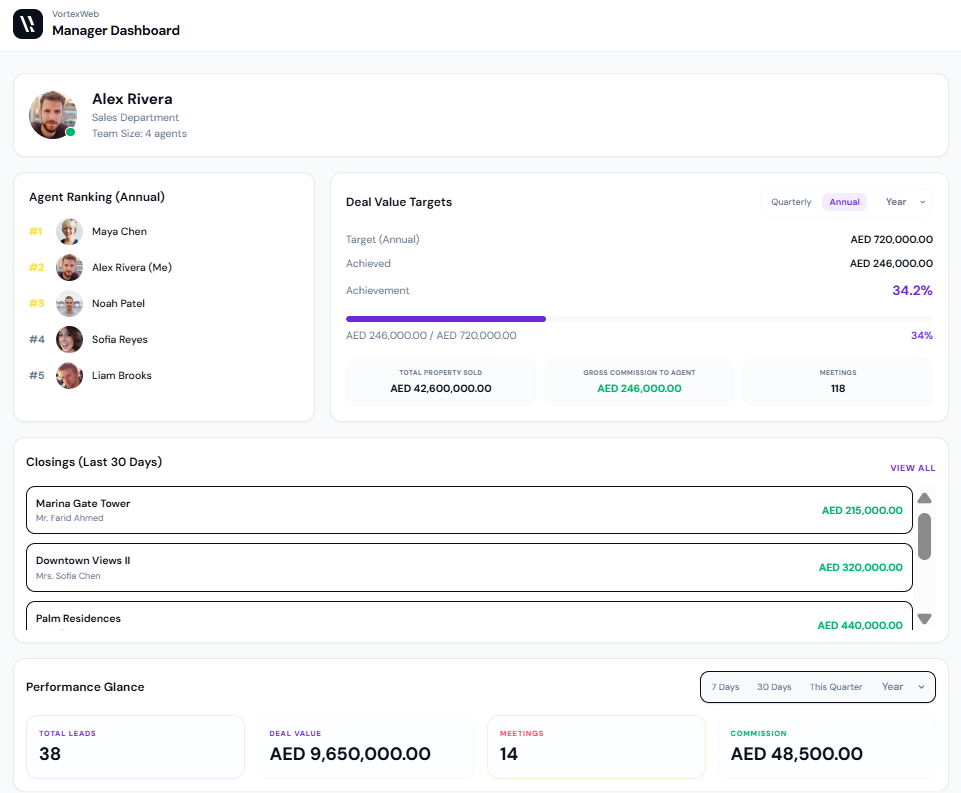
The home screen is the manager's day in one view: their own standing, their team's target, what closed, what is due, and where the quarter is heading.
Who they are, which department, how many agents report to them.
The team ranked for the year by commission, with the manager's own row marked. A manager who carries a book sees where they stand against their own agents.
Target, achieved and percentage, switchable between quarterly and annual, with a progress bar. Beneath it: total property sold, gross commission to agent, and meetings held.
Project, client and value, newest first, with a link to the full list.
Total leads, deal value, meetings and commission for the last seven days, thirty days, this quarter or the year.
What is due, with the time, and a count of what is pending.
A calendar strip with today marked.
Three monthly bar charts across the year: deals closed, active pipeline, meetings.
Nothing on that screen is prepared by anyone. It is there when the manager logs in.
What is the Team Hub?
The Team Hub is the manager's view of the whole team, in five tabs, each filterable by period.
A table of every agent with leads, meetings, closed value, pipeline value and gross commission, and the team total beneath. The manager's own row is in the list. This is the table a manager screenshots for the owner at month end.
Pick one agent from the team list and see their performance on its own: company rank and team rank, closed deal value, total leads, meetings, gross commission and pipeline value, switchable between weekly, monthly, quarterly and yearly. This is the screen for a one-to-one, and the manager can point it at themselves.
Every open deal across the team on one board, one column per stage, each card showing the agent, the property, the client and the value, filtered by agent and period. A manager sees at a glance where the team's deals are stuck.
Every scheduled meeting across the team, with the agent, the date and time, and the channel: Zoom, Teams, on site or in the office. Filtered by agent.
Quarterly and annual commission targets against actuals for every agent, side by side, each with a progress bar and percentage, and the quarterly and annual team totals beneath. The manager's own targets are in the list.
How does Vortex Team handle leads?
Two views. My Leads is the manager's own book. Team Leads is a summary per agent with the number that matters: leads not updated.
The manager's own leads with client, title, status, source and date, a search, a period filter, and an add-lead button. Statuses run from new through in-process, converted, agreed and junk.
One row per agent: total leads for the period and leads not updated. Team total beneath. A manager scanning it sees that one agent has 48 leads and 10 untouched while another has 28 and 4. That is the conversation for the morning huddle, and it is a number no manager gets from a generic CRM view without building a report.
How does a manager work the pipeline in Vortex Team?
From two boards, My Pipeline and Team Pipeline, both by stage, both with add-meeting and add-deal buttons on the screen.
The stages are the brokerage's own, configured at implementation. In a typical UAE secondary pipeline that runs from spoke to client and qualified to buy, through first meeting and multiple meetings, to unit chosen and offer sent, and on to close. Each card shows the property, the client, the value and the agent. Columns sort by date or value. The period filter runs from today to the year.
The manager's own deals sit on My Pipeline. The team's deals, including the manager's, sit on Team Pipeline. The same board also appears inside the Team Hub.
How does Vortex Team track tasks and meetings?
Both have a My view and a Team view, and both let the manager add from the screen.
Every task with its owner, ID and due time, filtered by today, seven days, the month, the quarter or the year. Team Tasks shows the whole floor's to-do list for the day, so the manager knows who is due to call the developer and who is due to send the offer pack before anyone asks.
Every meeting with the agent, date, time and channel. The manager adds a calendar event from the screen and checks in when a meeting starts, which timestamps it against the deal.
How does Vortex Team report closings?
My Closings shows the manager's own commission for the month, the quarter and the year, with each deal beneath. Team Closings shows every closing across the team with project, agent, client, deal value, commission and date, and the team total.
The commission figures come from the same rules configured for Vortex Pulse and Vortex HQ, so the number the agent sees, the number the manager sees and the number the owner sees are the same number.
Does Vortex Team include attendance?
Yes. My Attendance is the manager's own record. Team Attendance lists every agent with their role and a link to their records.
Each record carries the date, time in, time out, hours, location on a map, and a note the agent left for the day: a site visit in Marina, a client call morning, a closing meeting at Palm. For a brokerage where agents are on site visits half the week, location against the day matters. A manager looking at an agent's pipeline in the Drill Down can also see whether they were where they said they were.
Attendance records come from the brokerage's time clock, Vortex HR where the brokerage runs it.
What is the Team Report?
A card per agent with leads, deals, pipeline and conversion rate for the year, searchable, exportable, with a report card behind each card.
The report card opens the agent's detail: property value, gross commission, deals, leads, conversion and calls, a performance trend and their lead source mix. It is the same report card the agent sees in Vortex Pulse, so there is no argument about the numbers in a review.
How does a manager use Vortex Team across a week?
Home for their own day. Team Leads for who is sitting on untouched leads. Team Tasks for what is due across the floor. Ten minutes, then the huddle.
Team Pipeline to see where deals are stuck. Team Meetings to know who is out and where. My Pipeline and My Tasks for their own book.
Team Hub Overview for the numbers. Attendance for who was in. Closings for what landed.
Team Hub Targets against actuals, per agent and total. The Team Report cards for the one-to-ones. Export for the owner.
Who should have access to Vortex Team?
Sales managers and team leads. Vortex Team shows the manager their own agents and nothing beyond that, which is the point.
VortexWeb builds the three dashboards as a permission ladder. Vortex Pulse gives an agent their own work and the floor ranking. Vortex Team gives a manager their own work and their own agents. Vortex HQ gives the owner every department, every team, every agent. Team structure is configured at deployment, including multi-office brokerages where a manager covers agents across locations.
When should a brokerage deploy Vortex Team?
After Vortex Pulse, once agents are entering data consistently, and before Vortex HQ.
Pulse gives agents a reason to keep the CRM current. Team gives managers a reason to run the huddle from it. HQ is worth building once both of those are true, because it reports on the data the first two produce. Deploying Team before Pulse gives a manager a screen of numbers their agents are not yet entering.
How is Vortex Team priced?
Fixed price, not per agent. Choose one-time, quarterly or yearly. Deployed and configured by VortexWeb inside your Bitrix24, with team structure, pipeline stages and targets set to how the brokerage is organised.
Frequently asked questions
No. Vortex Team is scoped to the manager's own agents. Brokerage-wide visibility sits in Vortex HQ, which is intended for owners and directors.
Yes. Every module has a My view and a Team view. The manager's own leads, pipeline, tasks, meetings, closings and attendance sit alongside the team's, and the manager's own rank and targets appear on the home screen.
Yes. Quarterly and annual commission targets against actuals for every agent, with progress bars and a team total, in the Targets view of Team Hub.
Yes. The Team Leads summary shows total leads and leads not updated per agent for the period, so a manager sees who is sitting on untouched leads without running a report.
Yes. Team Pipeline shows every open deal across the team by stage, with the agent, property, client and value on each card, filtered by agent and period.
Yes. My attendance and team attendance, with time in, time out, hours, location on a map and a note per day. Where the brokerage runs Vortex HR, the records come from its time clock.
Scope. Vortex Team shows one manager their own agents and their own book. Vortex HQ shows owners and directors the whole business across every department. They are built as separate applications so permissions cannot leak.
Yes. The Team Report card for an agent shows the same figures the agent sees in their own Vortex Pulse report card, so a review is a conversation about one set of numbers rather than two.
Yes. It runs inside Bitrix24 and reads CRM data directly. It is deployed and configured by VortexWeb rather than self-installed.
A fixed price, not per agent, with one-time, quarterly and yearly options. Adding agents does not change the price. Request a quote and VortexWeb confirms the figure during the free audit.