
Vortex Route
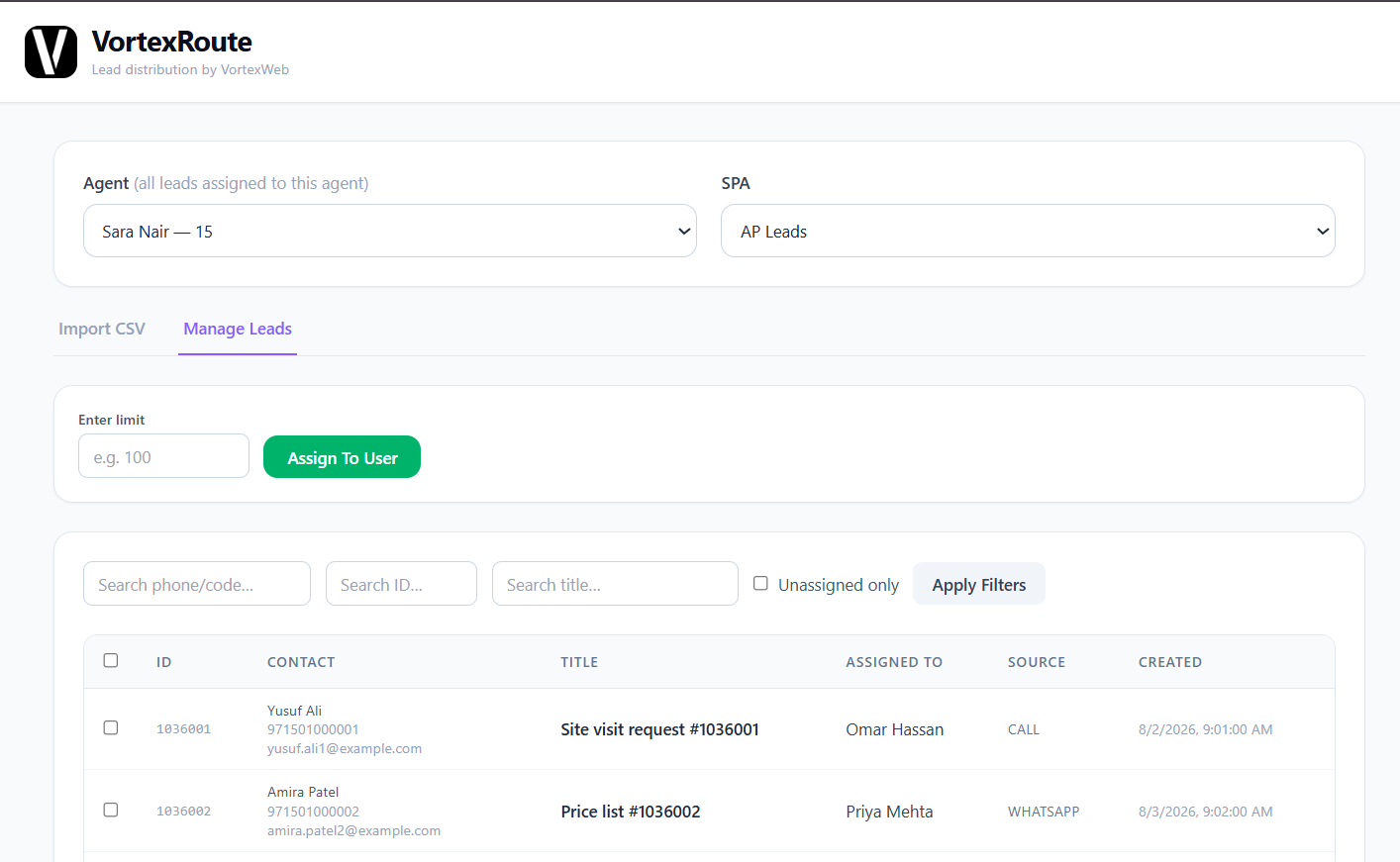
Vortex Route puts a lead database into Bitrix24 assigned to an agent in one action. Choose the agent, choose the pool, upload the CSV, and every lead lands owned, checked for duplicates on the way in. Or filter to what is unassigned, set a number, and hand the next 50 or 100 to the chosen agent in a click. Built for UAE brokerages that buy or inherit lead lists and currently divide them by hand.
What is Vortex Route?
Vortex Route is a bulk lead distribution application inside Bitrix24 that takes a file of leads, or a pool of unassigned ones, and turns them into owned CRM records for a chosen agent in one action.
It exists for one specific moment: a database arrives. A brokerage buys 4,000 leads, inherits a list from a developer, or exports last year's exhibition sign-ups. Somebody has to get those leads to agents, and in most brokerages that somebody opens the spreadsheet, splits it into tabs, sends each tab to an agent, and each agent imports their own. It takes a day, records get duplicated, and nobody can say afterwards which agent got what.
Vortex Route replaces that with an upload per agent, or a click per agent, and a history of every batch.
How does Vortex Route distribute leads?
Two ways, both inside Bitrix24, both ending with every lead owned by an agent in the pool the brokerage actually works from.
Select the agent. Select the pool, the Bitrix24 smart process the leads belong in, such as off-plan pool, secondary pool or secondary CRM. Choose the CSV. Every lead in the file lands in that pool assigned to that agent, with duplicates against the pool flagged on import. The import is logged in the history with what went where.
Open Manage Leads, filter to unassigned, search by ID or title, set a limit, and assign the next 50 or 100 to the selected agent in one click. Or tick the specific leads you want and assign those. Page through the pool and repeat for the next agent.
Each lead carries its source, the pool it sits in, who it is assigned to and when it was created, so the CRM shows the state of the database from the moment it enters.
Why does bulk distribution need its own tool?
Because the manual version fails in ways that cost money and are hard to see.
A day of someone's week, every time a list arrives.
Whoever divides the spreadsheet decides who gets the good leads, and everyone on the floor knows it. Route makes the split a visible number: this agent got 50, that agent got 50.
The same buyer in two batches, or already in the CRM, becomes two records worked by two agents who both call. Route checks on import.
Off-plan leads landing in the secondary pipeline, or the other way round, because the agent who imported the tab picked the wrong place. Route sets the pool before the file is uploaded.
When each agent imports their own tab, nobody can say afterwards which batch went to whom. Route keeps the import history.
What are the pools in Vortex Route?
The pools are your brokerage's own Bitrix24 smart processes, the structures VortexWeb configures during implementation for how the brokerage sells.
A typical UAE brokerage runs separate pools for off-plan, secondary sales, secondary leasing and a general lead request queue. Route lists them and puts the leads in the right one. A developer's off-plan launch list goes to the off-plan pool. A bought secondary database goes to the secondary pool. The agent working each pool sees the leads in the pipeline they already work from, not in a generic inbox.
Is Vortex Route the same as PropBridge?
No, and this is the distinction that matters most in VortexWeb's real estate range.
handles live portal enquiries. Somebody enquires on Property Finder, Bayut or dubizzle right now, and the lead arrives in Bitrix24 within seconds, already attributed to the listing owner. A live feed.
handles bulk databases. A file of hundreds or thousands of leads, put into a pool and assigned to agents in batches. A bulk import.
One is a stream. The other is a batch. Most brokerages running lead-generation campaigns need both, and they are never described as the same thing.
Who is Vortex Route for?
Brokerages that buy lead databases, run outbound campaigns from purchased lists, receive developer lead lists for off-plan launches, or collect leads at exhibitions and events in volume.
If your leads arrive one at a time from portals and ads, PropBridge and the lead channels in your setup package already cover you. Vortex Route is for the day a file arrives.
How is Vortex Route priced?
Fixed price, not per agent. Choose one-time, quarterly or yearly. Deployed and configured by VortexWeb inside your Bitrix24, with the pools connected to how you work.
Frequently asked questions
CSV. Export your database, Excel sheet or list to CSV and upload it against the agent and pool you choose. The file matches a fixed column format, or the columns are mapped to Bitrix24 fields at setup so your usual export uploads repeatedly without remapping.
Per agent, per batch. Select the agent, upload a file and every lead in it is theirs. Or filter the pool to unassigned, set a limit such as 50, and assign that many to the selected agent in one click. Repeat for the next agent.
Yes. Every import is checked against the pool, matched on the fields your brokerage uses to define a duplicate, usually phone number or email, so an existing client in a new database does not become a second record.
The one you choose before uploading. Route lists your brokerage's Bitrix24 smart processes, such as off-plan pool, secondary pool or secondary CRM, and puts the leads in the selected one so agents see them in the pipeline they already work from.
Yes. Every upload is recorded in the import history with what went where and when. The Manage Leads view shows each lead's source, pool, assignee and creation time.
No. PropBridge is a live feed of portal enquiries arriving one at a time within seconds. Vortex Route is a bulk import of a lead file assigned to agents in batches. Most brokerages running campaigns need both.
DNCR filtration is a separate integration that runs on import alongside Vortex Route, flagging registered numbers before any agent dials. Ask for it at scoping if your brokerage runs outbound campaigns from purchased lists.
A fixed price, not per agent, with one-time, quarterly and yearly options. Adding agents does not change the price. Request a quote and VortexWeb confirms the figure during the free audit.