Vortex Pulse
Vortex Pulse is the agent workspace for a UAE brokerage. Each salesperson opens one place inside Bitrix24 and sees their commission target and how far they are from it, where they rank on the floor, their leads, their pipeline, today's tasks, this week's meetings, their calls, their closings and what they have earned. Live, self-serve, and theirs alone.
What is Vortex Pulse?
Vortex Pulse is a personal dashboard and working screen inside Bitrix24 that shows an agent their own numbers and gives them the tools to move them: leads to call, deals to advance, tasks to close, meetings to hold, and a running total of what it is all worth.
CRM adoption fails when agents see the system as somewhere they put data in and get nothing back. They enter leads, log calls, update stages, and the only person who appears to benefit is management. Vortex Pulse changes the trade. The agent gets their target, their rank and their earnings on the first screen, calculated from the data they have been entering. That is usually what turns a CRM from an obligation into a tool.
What does an agent see in Vortex Pulse?
Ten modules, each answering a question an agent asks every day.
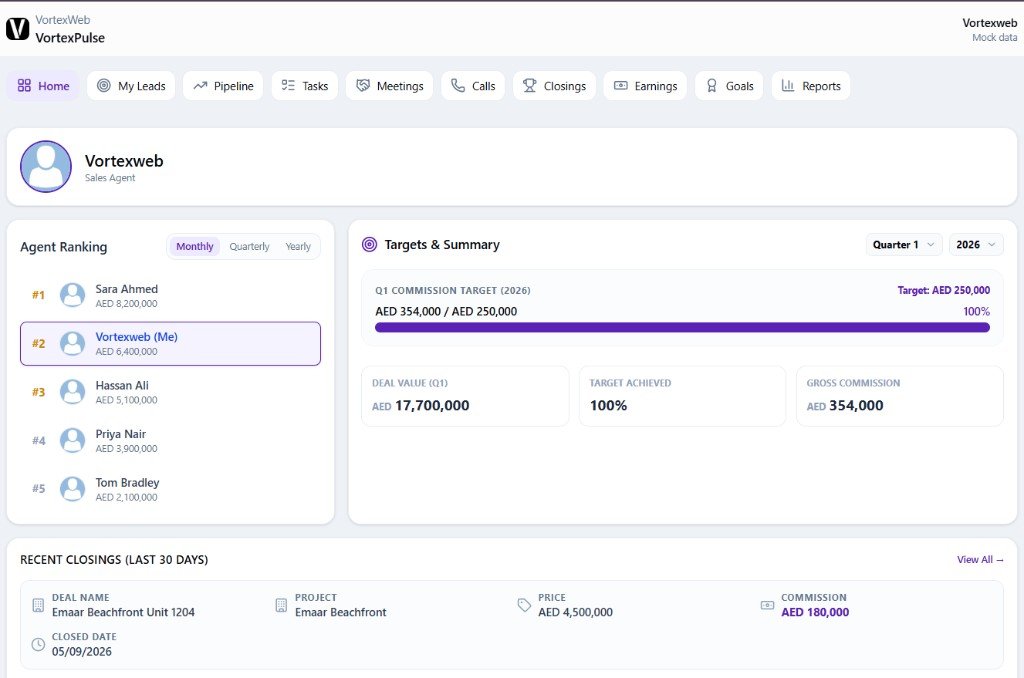
The agent's target for the quarter and how far they are from it, as a number and a progress bar. Deal value, target achieved and gross commission for the quarter. Where they rank on the floor by commission, monthly, quarterly and yearly. Recent closings. Leads, deal value, meetings and commission for the last seven days, thirty days, quarter or year. A performance trend of deals closed, pipeline volume and meetings by month. Today's tasks with due dates. This week's meetings as a calendar strip.
Every lead assigned to the agent: client, project, status with source, and created date. Search, filter by year, open any lead, or add a new one.
The agent's funnel by stage. Lead sources as a percentage breakdown. And the pipeline itself as a board, one column per stage, with deals sorted by date or value, a period filter, and buttons to add a meeting or a new deal without leaving the screen.
Every task assigned to the agent with its due date, searchable, with a create button. What the agent owes the deal today.
The agent's meetings, searchable, with one click to add a calendar event.
Every call logged against the agent, incoming, outgoing and missed, with the contact, number, date, time and duration. Filter by direction, search by name or number.
A commission summary for the month, the quarter and the year, and a ledger of every closed deal with project, deal value, commission, the agent's own earnings on it and the date closed. Open any deal from the row.
Commission paid over the last five months as a trend, total commission, lead conversion rate, and the number of won deals it is based on. Download to CSV.
Two goals, tracked live: leads converted as a percentage of leads received, and deals won as a percentage of deals worked.
The agent's self-report: monthly trends of calls, deals and leads, and an activity mix of calls, meetings, tasks and closures. Open the report card for leads, deals, calls, conversion and lead sources on one screen. Export to CSV.
How does Vortex Pulse show an agent their target?
Front and centre on the home screen: the commission target for the quarter, the amount achieved against it, the percentage, and a progress bar, with the quarter and year selectable.
Beneath it, three cards: deal value for the quarter, target achieved, and gross commission. An agent does not need to ask a manager how they are doing. The answer is the first thing they see when they open the CRM, and it moves the moment a deal closes.
Can agents see each other's numbers in Vortex Pulse?
They see the ranking, not each other's work.
The Agent Ranking widget shows where the agent stands against colleagues by commission, monthly, quarterly and yearly, with their own row marked. That is deliberate: a floor where everyone knows their position closes more. What an agent cannot see is another agent's leads, pipeline, tasks, calls or earnings. Those are private to each person. Full cross-team visibility sits with managers in Vortex Team and owners in Vortex HQ.
How does an agent work their pipeline in Vortex Pulse?
From a board, one column per stage, inside the same screen as their funnel and lead sources.
Deals sit in columns by stage and move as the agent advances them. Each column sorts by date or value. A period filter shows this month, last month, this quarter, the year or all time. Add a meeting or add a new deal from the same screen. The pipeline selector switches between pipelines where a brokerage runs more than one, off-plan and secondary for example.
Why does agent visibility matter for the brokerage?
Because it is the single strongest driver of whether a brokerage CRM gets used properly, and everything else the brokerage wants from the CRM depends on that.
Management dashboards are worth building only once the underlying data is being entered consistently. Data gets entered consistently when the person entering it sees something useful come back. Vortex Pulse is that something. It is usually the application that makes Vortex Team and Vortex HQ work, because it is the reason the numbers underneath them are real.
How does Vortex Pulse fit with Vortex Team and Vortex HQ?
Three dashboards, three permission levels, built as a ladder.
is the agent view. Their own work, plus the floor ranking.
is the manager view. Their own agents, and nobody else's.
is the management view. The whole brokerage, every module.
When should a brokerage deploy Vortex Pulse?
First, before the management dashboards. Most brokerages deploy Pulse alongside Vortex PropList and Vortex Propunit, because those three cover the agent's whole day: what is in stock, what is live, and what is mine to work.
How is Vortex Pulse priced?
Fixed price, not per agent. Choose one-time, quarterly or yearly. Deployed by VortexWeb inside your Bitrix24, usually first in the dashboard sequence, with targets and commission rules configured to how the brokerage sets them.
Frequently asked questions
They see the commission ranking, monthly, quarterly and yearly, with their own position marked. They cannot see another agent's leads, pipeline, tasks, calls or earnings. Cross-team visibility sits with managers in Vortex Team and owners in Vortex HQ.
Yes. Gross commission for the quarter on the home screen, a monthly, quarterly and annual commission summary on the Closings module, the agent's earnings on every closed deal, and a five-month payout trend on the Earnings module. Commission rules are configured to your structure during deployment.
Yes. The quarterly commission target with achieved amount, percentage and progress bar is the first thing on the home screen. Goals for lead conversion and deal win rate sit on their own module.
Yes. The Pipeline module is a board with one column per stage, deals sorted by date or value, and buttons to add a meeting or a new deal. Leads, tasks and meetings each have their own module with create buttons.
Yes. Every call against the agent appears with direction, contact, number, date, time and duration, filterable by incoming, outgoing and missed. Calls are logged through the brokerage's telephony integration.
Yes. The Reports module produces a self-report with monthly trends and activity mix, a report card with leads, deals, calls, conversion and lead sources, and CSV export. Earnings also export to CSV.
Yes. It runs inside Bitrix24 and reads CRM data directly. It is deployed and configured by VortexWeb rather than self-installed.
A fixed price, not per agent, with one-time, quarterly and yearly options. Adding agents does not change the price. Request a quote and VortexWeb confirms the figure during the free audit.