Vortex HQ
Vortex HQ is the management dashboard for a UAE brokerage. Units sold, sold value, gross commission, net commission and what is still receivable, by month, by developer, by lead source, by team and by agent, live from Bitrix24. Eight modules cover the overview, every deal, agent ranking, agent performance, team reports, who has stopped closing, the org chart and the pipeline. Built for owners and directors.
What is Vortex HQ?
Vortex HQ is a live, top-level dashboard inside Bitrix24 that shows the whole brokerage to the people who run it: every deal, every commission, every developer, every lead source and every agent, rolled up into the numbers an owner actually manages by.
Most brokerage owners get their numbers on a delay. Someone pulls figures on a Sunday, formats them into a deck, and by the time the meeting happens the picture is a week old and nobody fully trusts it because the underlying data was hand-assembled. Vortex HQ reads the CRM directly. The number on screen is the number in the system, at the moment you look at it, and almost every table exports.
What does Vortex HQ show?
Eight modules, each answering a question an owner asks every week.
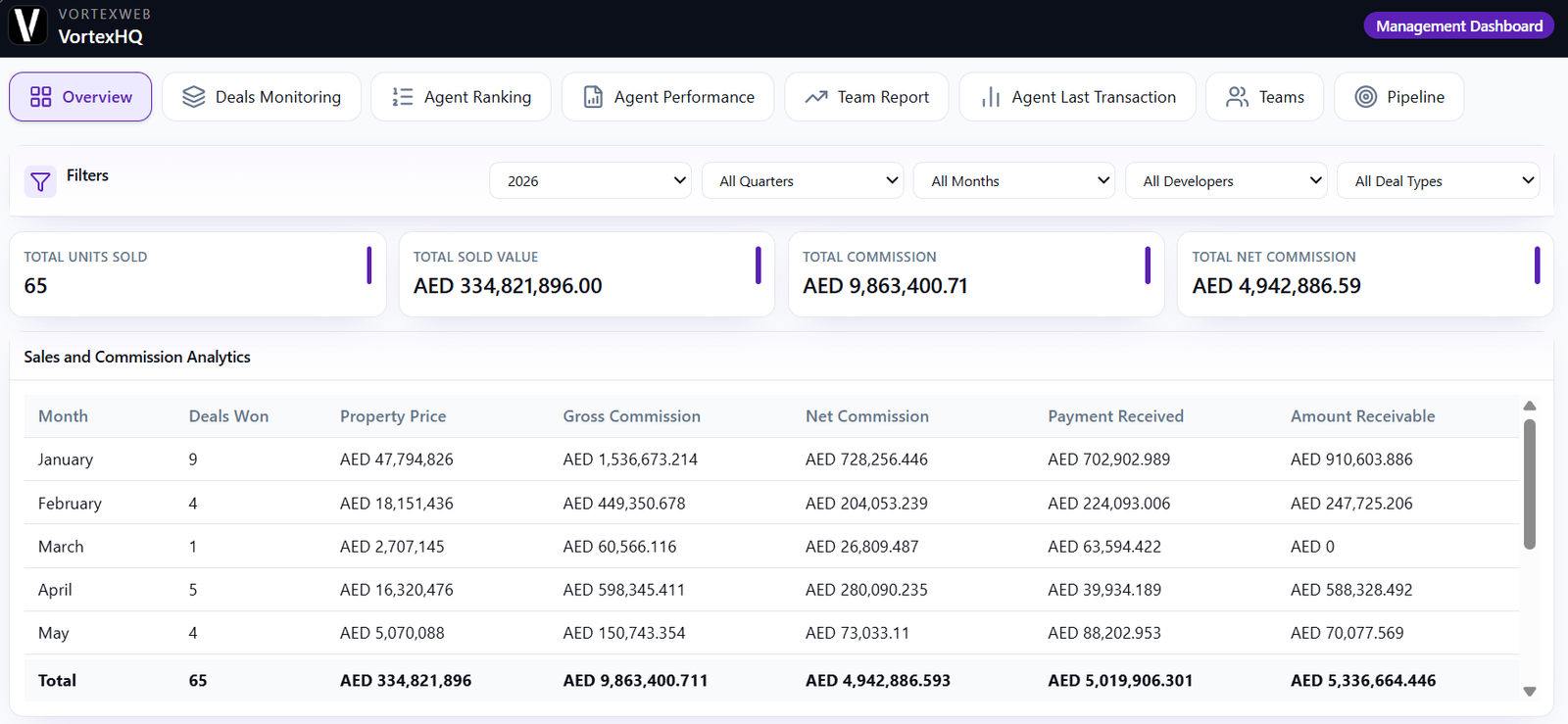
Total units sold, total sold value, total commission and total net commission for the period, filtered by year, quarter, month, developer and deal type. Beneath it, sales and commission analytics by month: deals won, property price, gross commission, net commission, payment received and amount receivable. Sales split by secondary and off-plan. Developers ranked by units, gross commission, value and share. Transactions broken down by lead source, by value and by volume.
Every deal in the brokerage in one table: agent, date, sale or rent, off-plan or secondary, project, unit number, developer, property type, bedrooms, client, team and price, with a running total. Filter by year, month, transaction type, property type, developer, agent, team and invoice status. Search, archive, export.
Every agent ranked by gross commission, property value or deals, with the figures by month, by quarter and for the year side by side. Filter by team. The leaderboard management uses, not the one on the sales floor.
One agent, one year: gross commission by month, by quarter and for the year. The screen for a one-to-one.
A card per agent with leads, deals, pipeline and conversion rate, filtered by role and sales team. Open any card for the full report: property value, gross commission, deals, leads, conversion and calls, a five-month trend of calls, deals, leads and meetings, and lead source distribution. Export to CSV or PDF.
Every agent with their team, who hired them, joining date, last deal date, last project, last property price, last gross commission, and the number that matters: months without closing. The report that tells an owner who needs a conversation before the quarter ends.
The brokerage org chart: management, marketing and the sales department, with heads, managers and consultants, so the structure the reports roll up to is visible in one place.
Pipeline health as a funnel from leads to qualified to viewings to offers to closures. Lead source effectiveness across every channel. And missed leads in the last 24 hours, by source and agent with the age of each, with one click to create follow-up tasks for all of them.
How does Vortex HQ track commission?
Four ways, because a brokerage's commission number is four numbers.
on every closed deal. Net commission after splits and deductions, configured to your structure. Payment received from the developer or client. Amount receivable, the gap between what has been earned and what has been collected.
Month by month and in total, so the owner sees not just what the brokerage sold but what it has actually been paid and what is still outstanding. That last column is usually the one nobody was tracking.
Which developers and lead sources produce revenue?
Vortex HQ answers both on the overview, because both decide where next quarter's effort goes.
are ranked by units, gross commission, value and share of total, so an off-plan brokerage sees which developer relationships are worth what.
are broken down by value and by deal count: referral, Bayut, Property Finder, dubizzle, website, Meta ads, agent social media, personal leads, company leads, walk-in. Most brokerages discover that the source producing the most enquiries is not the one producing the most closed value. That is the finding that reallocates the marketing budget.
Who has stopped closing?
The Agent Last Transaction module answers it in one column: months without closing.
Every agent, their team, whether the company or an agent hired them, when they joined, when they last closed and what it was worth. Sorted, an owner sees at a glance who has gone quiet, and can separate a new joiner in their first quarter from a three-year agent who has not closed since April. It is the report that turns a vague sense that someone is struggling into a date and a number.
What happens to a lead nobody answered?
It appears on the Pipeline module the next morning under missed leads, with the source, the agent it was assigned to or "unassigned", and how long it has been sitting.
One click creates follow-up tasks for all of them in Bitrix24. The owner does not chase the manager; the tasks are already on the agents' lists.
Who should have access to Vortex HQ?
Owners and directors. Vortex HQ shows the whole business, which is precisely why it is not the right dashboard for an agent or a team manager.
VortexWeb builds the three dashboards as a permission ladder. Vortex Pulse gives an agent their own work and the floor ranking. Vortex Team gives a manager their own agents without exposing the rest of the brokerage. Vortex HQ gives the owner everything. Brokerages usually deploy them together, in that order.
When should a brokerage deploy Vortex HQ?
Once the pipeline is trustworthy. There is no value in a management dashboard over data the team is not yet entering consistently.
The usual sequence is Vortex Pulse first, because agent visibility is what drives CRM adoption, then Vortex Team once managers are running their huddles from the CRM, then Vortex HQ once the numbers underneath are reliable enough to make decisions on.
How is Vortex HQ priced?
Fixed price, not per agent. Choose one-time, quarterly or yearly. Deployed and configured by VortexWeb inside your Bitrix24, with commission rules and division structure set to how the brokerage works.
Frequently asked questions
Bitrix24 reporting is generic. Vortex HQ is built around how a UAE brokerage measures itself: gross, net, received and receivable commission by month, developers ranked by value, lead sources by closed value, agents ranked by quarter, months since each agent last closed, and missed leads with one-click follow-up, across eight modules on one dashboard.
Four figures per deal and per month: gross commission, net commission after your splits and deductions, payment received, and amount receivable. Splits and deductions are configured to your structure during deployment.
Yes. Transactions are broken down by lead source by value and by deal count, covering portals, website, Meta ads, referrals, agent social media and walk-ins. Lead source effectiveness also appears on the pipeline module.
Yes. The Agent Last Transaction module lists every agent with their last deal date and months without closing, alongside joining date and who hired them, so a new joiner is not confused with an agent who has gone quiet.
Yes. Deals, developer analysis, agent ranking, agent last transaction and team reports export to CSV, and individual agent reports export to PDF.
Yes. Vortex HQ is intended for owners and directors, and permissions are set during deployment. Team managers use Vortex Team, which shows only their own agents. Agents use Vortex Pulse, which shows only their own work.
Yes. It runs inside Bitrix24 and reads CRM data directly. It is deployed and configured by VortexWeb rather than self-installed.
A fixed price, not per agent, with one-time, quarterly and yearly options. Adding agents does not change the price. Request a quote and VortexWeb confirms the figure during the free audit.