SpotClock
SpotClock adds employee attendance to Bitrix24. One-tap clock in and out from the Bitrix24 desktop or mobile app, GPS-verified on mobile, with every session synced to Bitrix24 as it happens. A live attendance dashboard, a map of where people clocked in, per-person management permissions and a full audit log. Free forever for small teams. Attendance capture is never blocked on any plan.
Install on the Bitrix24 Marketplace
| Platform | Install time | Free tier | Support |
|---|---|---|---|
| Bitrix24 | Minutes | 5 employees, 150 clock events a month | Community, WhatsApp on paid tiers |
Prices on this page reviewed 5 September 2026.
What is SpotClock?
SpotClock is an attendance tracking application that runs inside Bitrix24, so clock-ins, hours and absences live in the same system as your CRM and tasks rather than in a separate tool nobody reconciles.
Most businesses track attendance somewhere else: a spreadsheet, a standalone app, a device on the wall with its own software. Every one of those is a second source of truth that someone has to export and match to employees. SpotClock removes that layer. The attendance record is a Bitrix24 record, synced the moment it is created.
What does SpotClock do?
SpotClock covers eight things, and every one runs inside the Bitrix24 portal your team already uses.
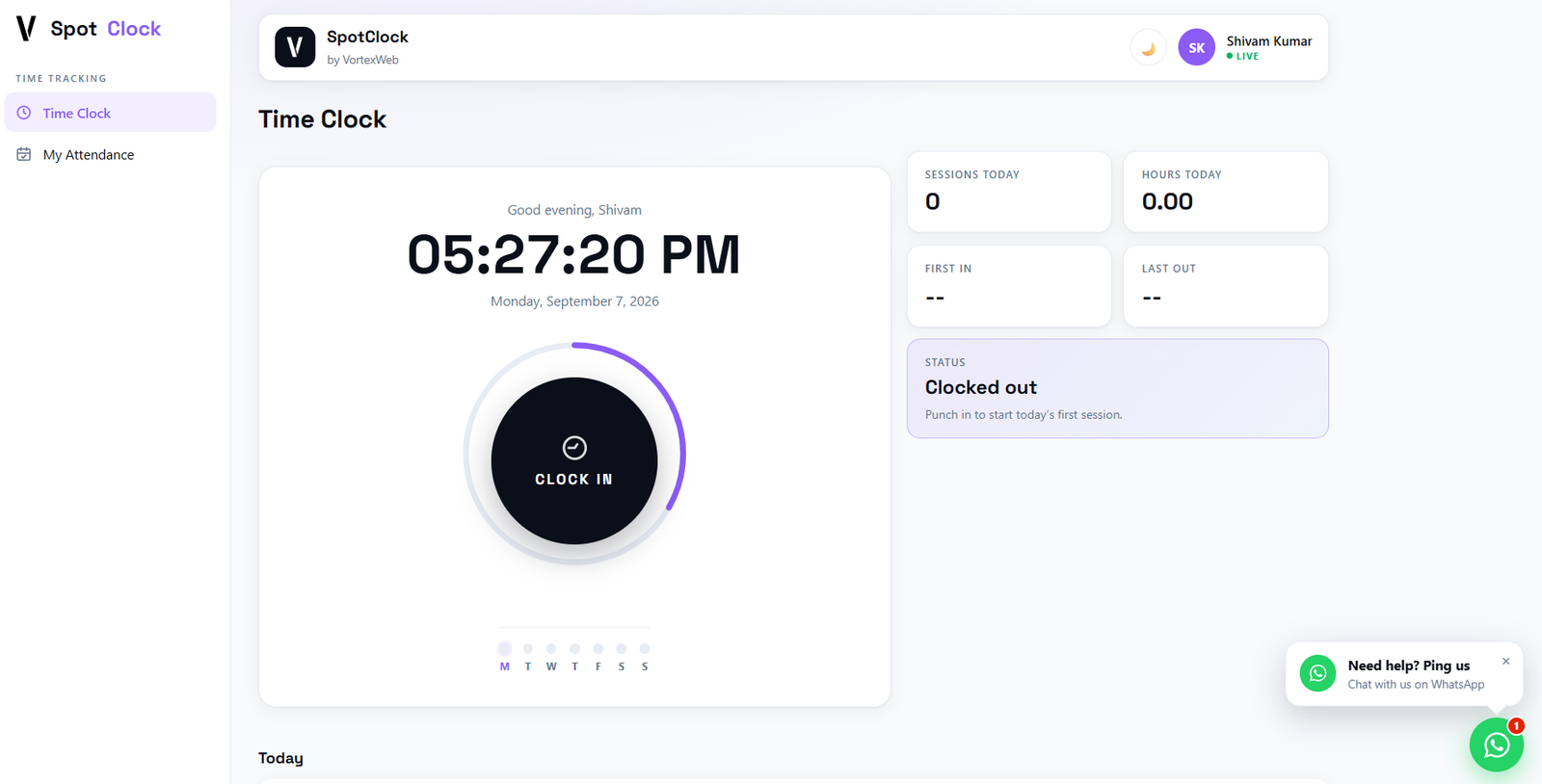
One tap to clock in, one tap to clock out. Sessions, hours, first in and last out for the day, and a week view. Status shows whether the session is live and synced to Bitrix24.
Clock-ins from the Bitrix24 mobile app carry location. Desktop clock-ins record without it, and the app tells you which is which, so you know when a clock-in is verified and when it is not.
Each employee sees their own record: date, in, out, hours, status and sync state. No asking HR.
Total employees, present today, absent today and average hours, filtered by employee and month, with a table view and a map view. Export to CSV.
Every GPS-tagged clock-in for the month plotted on a map. Useful for field teams, multi-site businesses and anyone who needs to know that a clock-in happened where it should have.
Management access granted per person: who can see the dashboard, who can see the map, who can export. Portal administrators always have every permission.
Work start time, work end time, grace period in minutes, and whether to prefer GPS-verified clock-ins.
Every clock event recorded with time, action, employee, hours and sync status. The record of what happened, in order, that nobody can quietly edit.
How does SpotClock get installed?
SpotClock installs from the Bitrix24 Marketplace and is running the same day.
Open Bitrix24 Marketplace, search SpotClock, install. The app appears in the left menu.
Work start, work end and grace period in App Settings. Turn on GPS preference if you want location on every clock-in.
In Permission Manager, choose who sees the dashboard, the map and the export. Everyone else sees only their own attendance.
Clock in from desktop or from the Bitrix24 mobile app. Every session syncs to Bitrix24 automatically.
How does GPS verification work in SpotClock?
Clock-ins made through the Bitrix24 mobile app carry the device's location and are marked as GPS-verified. Clock-ins made from the Bitrix24 desktop app record the time without location, because the desktop environment does not expose it, and SpotClock says so on the screen rather than pretending otherwise.
The Attendance Map plots every GPS-tagged clock-in for the month. The App Settings toggle lets an administrator prefer GPS-verified clock-ins, so a business that needs location on every record can require the mobile app.
How much does SpotClock cost?
SpotClock is free forever for up to 5 active employees and 150 clock events a month. Paid tiers are priced per Bitrix24 portal, not per user, and every tier includes attendance capture without limit. Limits and paid features apply to management tools only.
| Free | Pro | Business | |
|---|---|---|---|
| Price | Free | USD 15 / month per portal | USD 39 / month per portal |
| Active employees per month | 5 | 50 | Unlimited |
| Clock events per month | 150 | 5,000 | Unlimited |
| Time Clock and My Attendance | Yes | Yes | Yes |
| Attendance Dashboard | Yes | Yes | Yes |
| Attendance Map | — | Yes | Yes |
| CSV export | — | Yes | Yes |
| Support | Community | Priority WhatsApp |
Monthly or yearly billing. Licence keys are supported for businesses that buy through a VortexWeb partner.
Is SpotClock the same as Vortex HR or Vortex People?
No. SpotClock records when people are present, for any business, self-installed from the marketplace. Vortex HR is the full HR platform for UAE real estate brokerages, deployed by VortexWeb, and includes its own time clock, so a brokerage on Vortex HR does not need SpotClock for the same job. Vortex People is a standalone HR product that runs without Bitrix24, launching soon.
Many businesses run SpotClock alongside one of the others. It overlaps less than the names suggest: SpotClock is attendance; the HR applications are everything else about the employee.
Frequently asked questions
Yes. The Free plan has no time limit and covers up to 5 active employees and 150 clock events a month, with the Time Clock, My Attendance and the Attendance Dashboard included. Attendance capture is never blocked on any plan; the limits apply to management tools only.
Yes. SpotClock installs from the Bitrix24 Marketplace into cloud and self-hosted portals. Every clock event syncs to Bitrix24 as it happens, and the sync status is shown on each record.
Yes, from the Bitrix24 mobile app. Mobile clock-ins carry GPS and appear on the Attendance Map. Desktop clock-ins record the time without location, and the app shows which clock-ins are verified. An administrator can set the app to prefer GPS-verified clock-ins.
Inside your own Bitrix24 portal. Every session syncs to Bitrix24, and the Audit Log records every event with its sync status. VortexWeb does not retain employee attendance data on its own servers.
Yes. The Permission Manager grants management access per person: dashboard, map and export are each a separate permission. Employees without management access see only their own attendance. Portal administrators always have every permission.
Yes. Work start, work end and a grace period in minutes are set in App Settings and apply across the portal.
Per Bitrix24 portal, not per user. Free covers 5 active employees. Pro at USD 15 a month covers 50. Business at USD 39 a month is unlimited. Monthly or yearly billing, cancelled from your Bitrix24 admin.
No. SpotClock is attendance, installable by anyone from the marketplace. Vortex HR is the full HR platform for UAE real estate brokerages, deployed by VortexWeb, with its own time clock. A UAE brokerage on Vortex HR has attendance covered inside it.
Install on the Bitrix24 Marketplace
For questions or custom development: products@vortexweb.ai